Wallet Overview
EXTRA WALLET is a next-generation browser wallet designed for security, flexibility, and extensibility. It moves beyond the traditional "single account" model to offer a powerful portfolio management system.
Architecture & Hierarchy
The wallet is organized into a three-level hierarchy to help you manage diverse assets across multiple networks:
- Portfolio: The top-level container protected by a password. It can include multiple wallets (e.g., Personal, Business, Cold Storage).
- Wallet: A container within a portfolio that is linked to a specific mnemonic phrase. From this single mnemonic, the wallet can derive and manage accounts across multiple blockchains (e.g., Bitcoin, Ethereum, Solana).
- Account: An entity related to a blockchain-specific address derived from a wallet’s mnemonic.
Dashboards
The wallet UI is split into two functional layers:
- Top section — portfolio/wallet performance and distribution
- Bottom section — detailed asset and transaction data
Top Section: Overview & Performance
This section changes depending on the current context (portfolio vs wallet) and selected view.
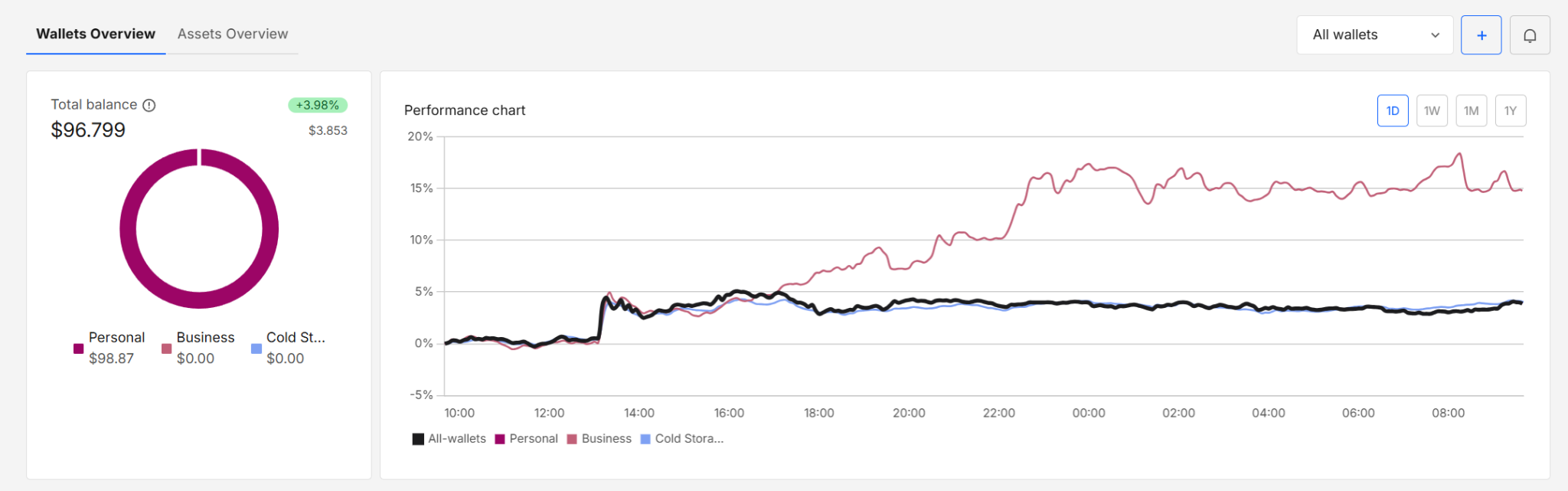
Wallets Overview (Portfolio Level)
Displays aggregated performance across all wallets, grouped by wallet (e.g., Personal, Business, Cold Storage).
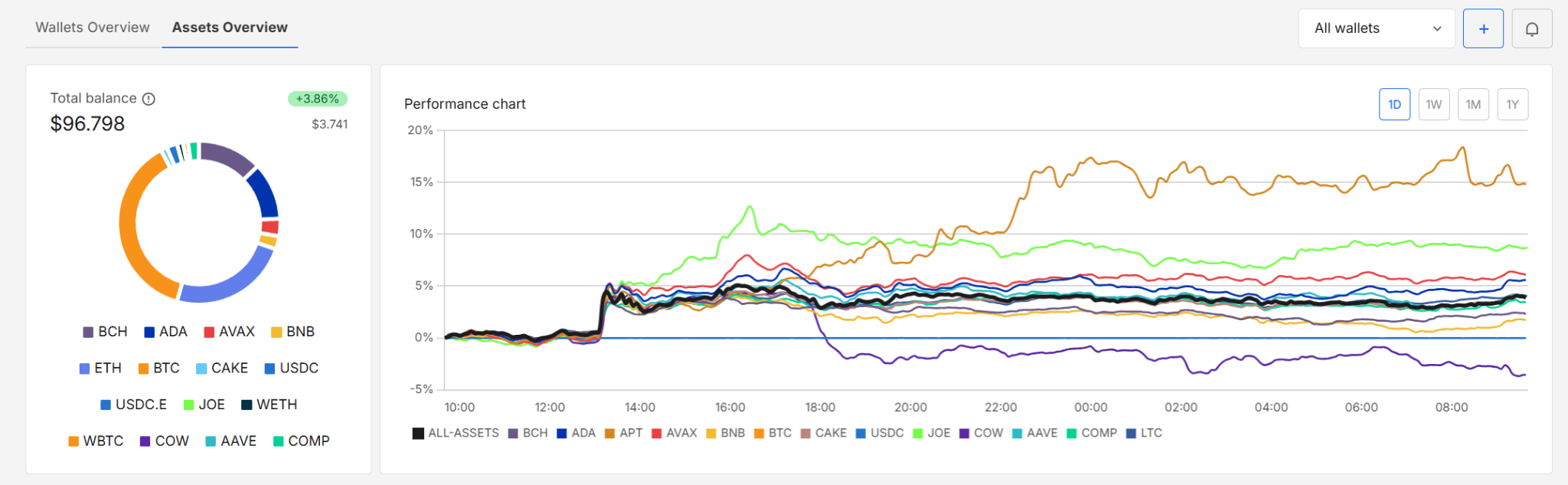
Assets Overview (Portfolio Level)
Shows asset distribution and performance across the entire portfolio, aggregated by tokens instead of wallets.
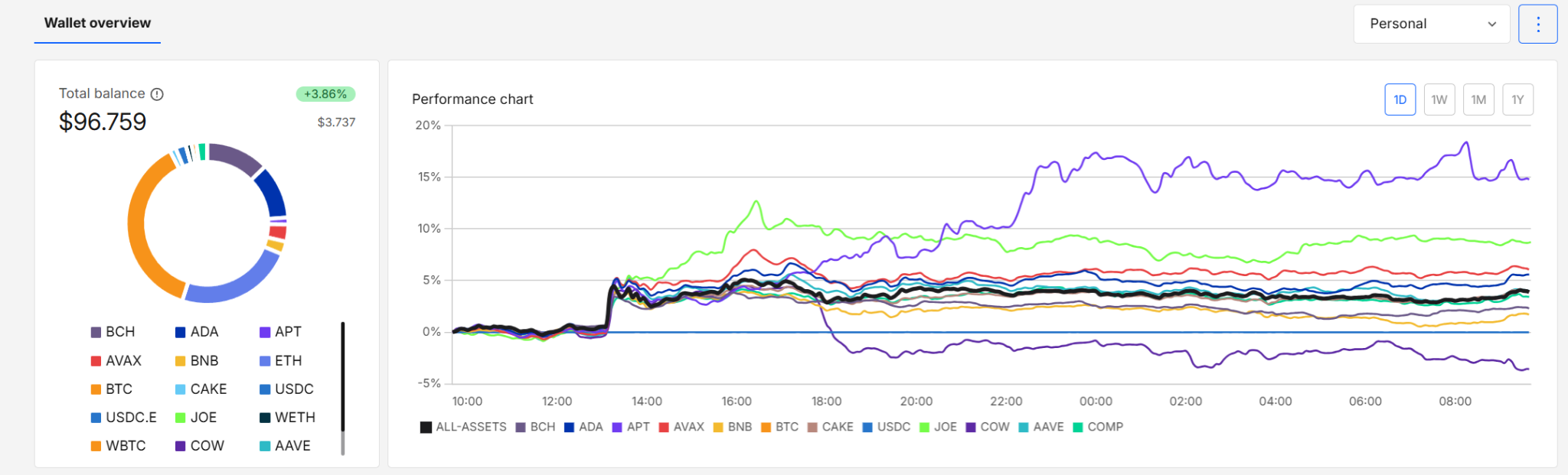
Wallet Overview (Wallet Level)
Focused view for a single wallet (single mnemonic), showing its asset allocation and performance.
Bottom Section: Data Tables
This section displays detailed data based on your current selection — either the full portfolio or a single wallet. Regardless of the selection, it always contains the same two tabs: Assets and Transactions.
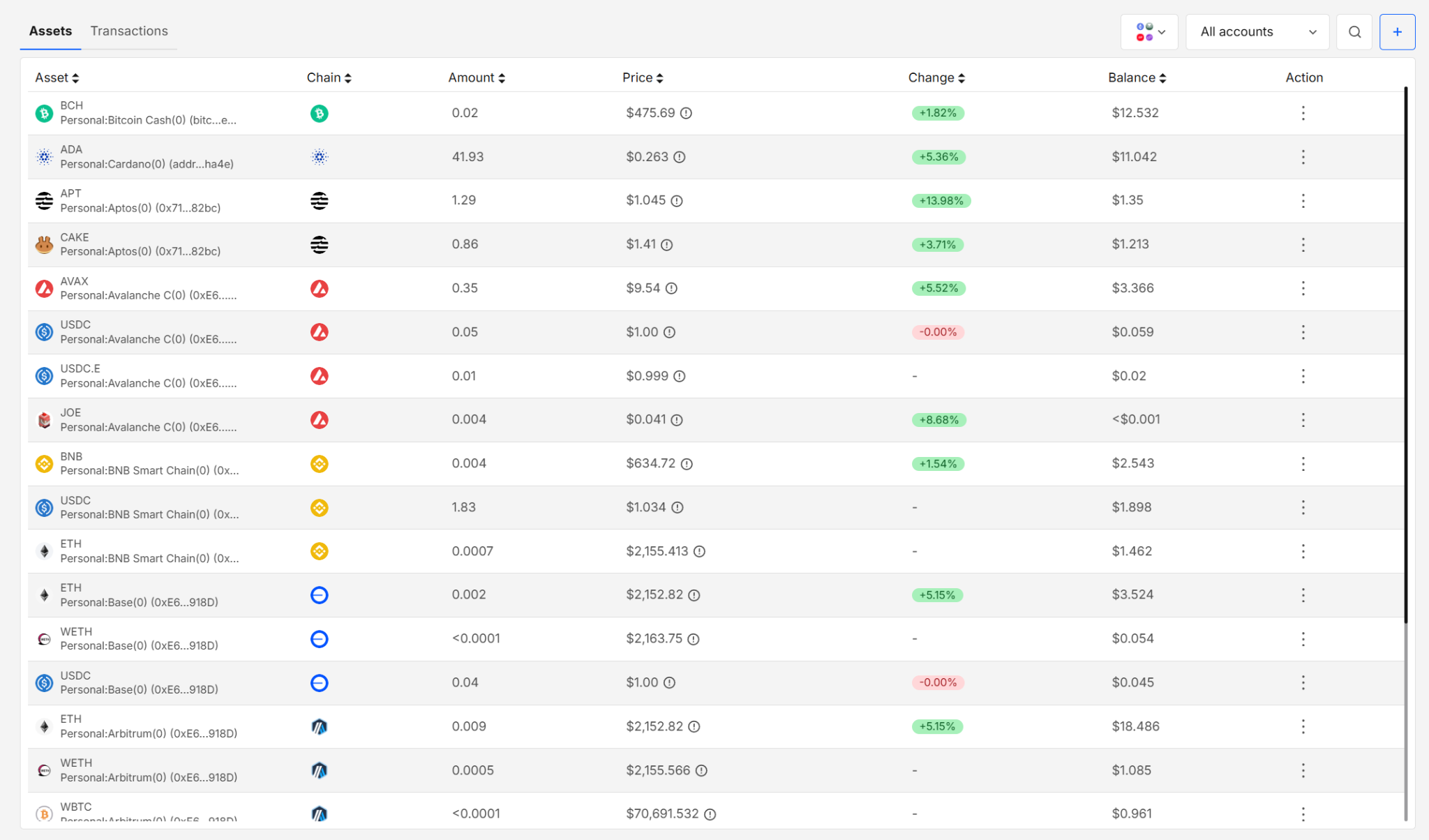
Assets Tab
Displays assets with:
- chain association
- balances
- price and change
- per-asset breakdown
Transactions Tab
Provides a full transaction history with:
- timestamps
- account and chain
- transaction type
- status and amounts
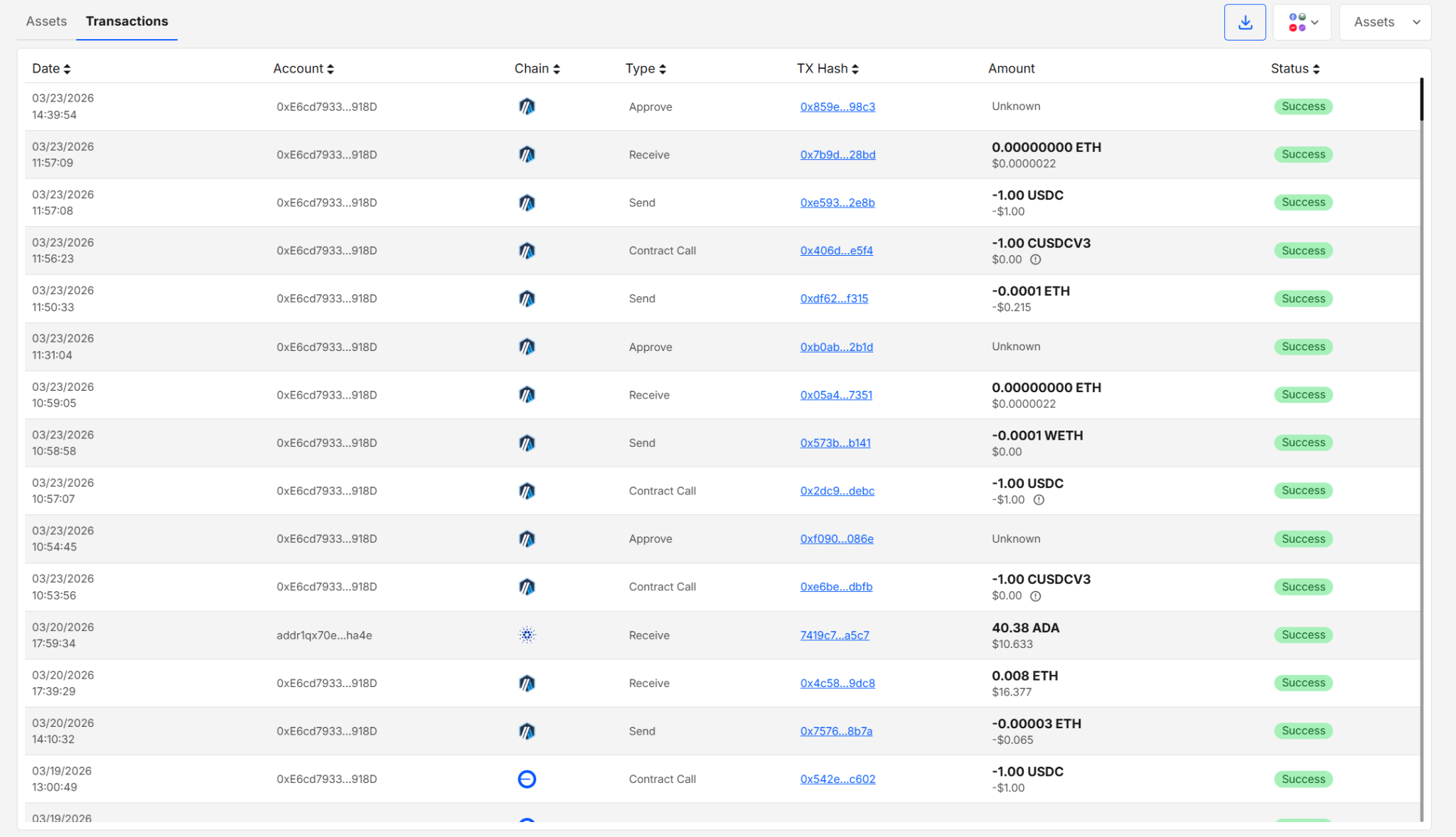
Exporting Transactions
From the Transaction tab, you can export your portfolio data for analysis, reporting, or record-keeping. Each export consumes credits from your credits balance.
The exported transaction file contains structured transaction and account data with the following fields:
- Chain ID — unique identifier of the blockchain network
- Network — name of the blockchain (e.g., Arbitrum, Ethereum)
- Account — wallet address associated with the transaction
- Tx Hash — unique transaction identifier
- Timestamp — exact time of the transaction (Unix format)
- Date — human-readable transaction date and time
- Type — transaction type (e.g., Send, Receive)
- Status — transaction result (e.g., Success, Failed)
- Assets — transferred asset and amount (including fiat equivalent, if available)
- Explorer URL — direct link to view the transaction on a blockchain explorer
Clicking the Export button opens the export modal:
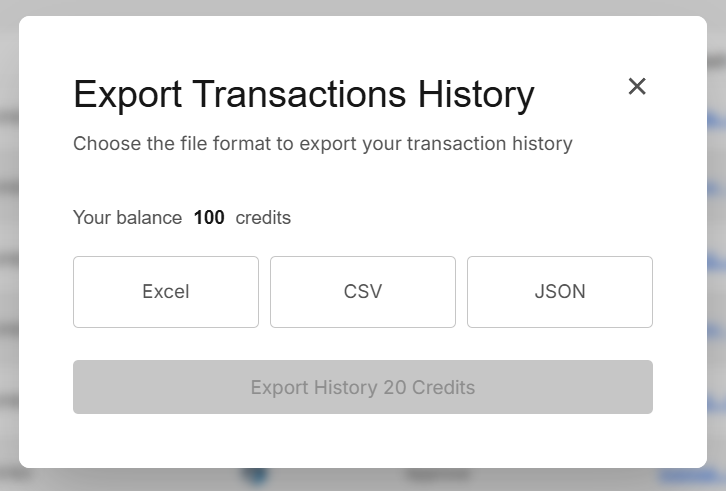
Export Options
- Excel (.xlsx) — structured for spreadsheet analysis
- CSV (.csv) — lightweight and portable
- JSON (.json) — raw structured data for integrations
👉 For more details, explore the Payment Service Services and Pricing section.
Key Features
Apps
EXTRA WALLET is built on a modular architecture. Instead of bloating the core wallet with every possible feature, we offer the model where you can enable only the apps you need.
- Lazy Loading: App code is loaded only when you enable it. If an app is disabled, its code is never fetched or executed in your browser.
- Security: This approach minimizes the attack surface. Potentially unsafe or experimental third-party apps cannot run code in your wallet unless you explicitly turn them on.
Offline Mode
The wallet automatically detects when your network connection is lost and switches to a limited offline mode. In offline mode you can:
- Safely import or create wallets to the portfolio and export them online using the Wallet Expander
- Encrypt and decrypt QR codes
- Securely sign transactions exported from online wallet, and download them
👉 Explore the Offline Wallet docs
External Wallets
You aren't limited to keys generated inside EXTRA WALLET. You can connect external wallets (Ledger, MetaMask, Trust Wallet, etc.) to manage them within the same unified interface.
Security
Security is the core of EXTRA WALLET. We use a split security model where all sensitive operations (key management, signing) happen in an isolated Signer application running in a separate iframe.
- The main wallet UI never sees your private keys.
- All secrets are encrypted and stored only in the Signer's isolated storage.
👉 Read the full Security Model
Developer Info
Simple Start
- Install dependencies: Run
nvm install(if needed) andnvm use, thenyarnin the root directory. - Configure Environment: Fill in
.env:VITE_API_URL:https://api-staging.extrawallet.app(see API docs)VITE_URL_IFRAME:http://localhost:5001or the production URL.PRIVATE_KEY: EVM private key for build signatures.VITE_BUILD_TARGET:offlineoronline.VITE_WALLET_CONNECT_PROJECT_ID: Your WalletConnect ID.
- Start Signer: If using localhost for the iframe, ensure the signer is running on port 5001.
- Run App:
yarn dev.
All sensitive operations (mnemonic access, signing) must be implemented inside the signer iframe. The main app never touches raw private keys.
Build and Test
To build the application for production:
# Build for online mode
yarn build:online

# Build for offline mode
yarn build:offline
What happens during build:
- Module Parsing: Scans
module.config.tsfiles to determine which modules to include. - Core Build:
- Copies files to a temporary build directory.
- Computes checksums and signatures of core files.
- Generates
public/build.manifest.jsonorpublic/offline-build.manifest.json.
- App Build:
- Bundles the application using Vite.
- Outputs to the
distdirectory.
Preview:
Run yarn preview to serve the production build locally.
- Built and maintained by the EXTRA WALLET team.
- Source: EXTRA WALLET