Secure Info
About
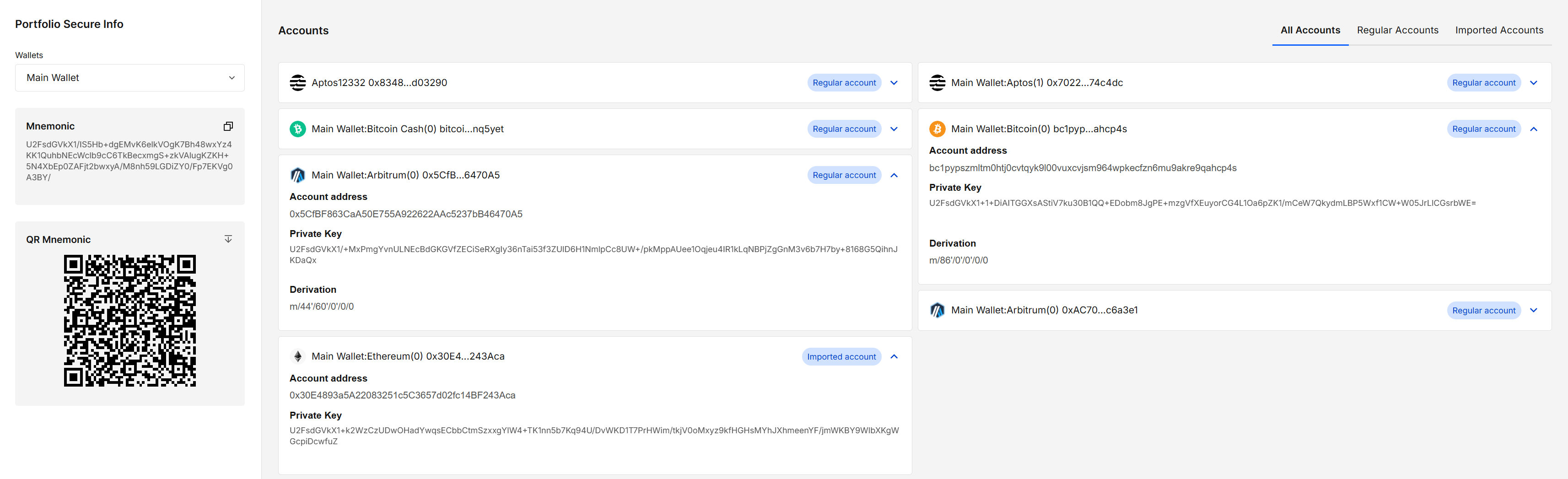
Secure Info lets you inspect public and sensitive data for a wallet in your portfolio.
Public details (addresses, paths, labels) are shown immediately. Sensitive details (mnemonic, private keys) are masked and can be revealed temporarily after confirming your portfolio password.
Key features
- On-demand reveal of sensitive fields (mnemonic, private keys) after password confirmation
- Auto-hide: revealed secrets are re-masked after 5 seconds
- Public details (addresses, derivation, account type) always visible
- Wallet selector to switch between the wallets in your portfolio
- Isolated secrets view: password & secrets render inside a separate-origin iframe
- Encrypted QR mnemonic export (protected with your portfolio password)
How to use
1. Choose a wallet
- The first wallet in your portfolio is selected by default.
- Use the Wallets dropdown to switch wallets. The Accounts list refreshes for the selected wallet.
2. Review public details
- In Accounts, each entry shows public information (network, address, derivation, account type: Regular / Imported).
- These are always visible and safe to read.
3. Reveal sensitive details (per field)
- Click a masked field (e.g., Mnemonic, Private Key).
- Enter your portfolio password in the modal and Confirm.
- The value is revealed for 5 seconds, then auto-hides.
The short reveal window reduces shoulder-surfing and screenshot risk. You can reveal again at any time by re-confirming your password.
4. Download an encrypted QR of the mnemonic (optional)
- In the Mnemonic panel, use QR Mnemonic → Download to save a password-protected QR file.
- It’s encrypted with your portfolio password and can be decrypted later with Secure QR by entering the same password.
Results explained
| UI element / action | What it does |
|---|---|
| Wallets dropdown | Selects which wallet’s secure/public details are displayed. |
| Click encrypted text | Opens a password modal to temporarily decrypt that field. |
| Decrypted view (5s) | Shows the secret for 5 seconds, then auto-re-locks. |
| QR Mnemonic → Download | Saves an encrypted QR image of the mnemonic (uses portfolio password). |
Security & privacy
- Secrets (password fields, revealed values) render inside a separate-origin iframe; the host page cannot read that DOM.
- We never store your password; each reveal requires a fresh confirmation.
- The encrypted QR uses your portfolio password — keep it strong, unique and separate.
Avoid revealing secrets in public places. Malware, screen recorders, and clipboard sync can exfiltrate data. Keep your device clean.
FAQ
Can I change the 5-second timeout?
Not currently.
What if I forget my portfolio password?
We cannot recover it. Back up your portfolio regularly and store your password securely.
Can I decrypt the QR mnemonic outside the app?
Yes — use Secure QR and enter the same portfolio password used to encrypt it.
Does revealing a private key put it on a server?
No. The value renders locally inside the signer iframe; nothing is uploaded.
Developer Info
- Built and maintained by the EXTRA WALLET team.
- Source: EXTRA WALLET