App Store Extensions
About
The App Store is the heart of EXTRA WALLET's extensibility. Unlike traditional wallets that bundle every possible feature into a monolithic app, EXTRA WALLET uses a modular architecture.
The core wallet is lightweight and focused on the essentials: portfolio management and security. All other features—from dApp connectivity to advanced risk analysis—are available as optional extensions.
For advanced users, Extra Wallet also supports the manual addition of third-party extensions. This allows experienced users to integrate custom or external functionality beyond the built-in App Store offerings. More details can be found in the Extension Integration section.
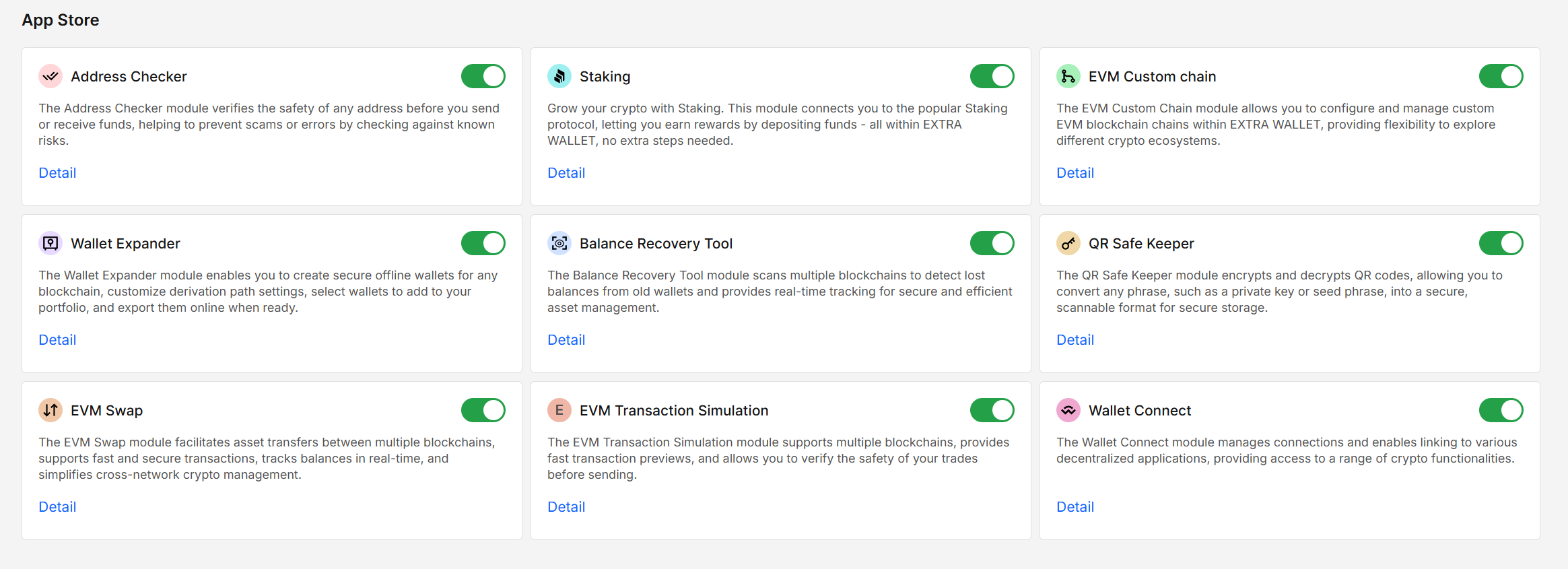
Security & Architecture
Our extension system is designed with security as the top priority. It is not just a "plugin system"; it is a security feature in itself.
Offline Mode & Core Capabilities
EXTRA WALLET includes a small set of trusted core tools that are required for safe and usable operation in offline mode.
Tools such as Wallet Expander and Secure QR are always loaded into your browser for the wallet to run offline. These tools are bundled with the core wallet, require no network access, and do not fetch remote code.
This ensures that essential offline workflows (backup, recovery, secure transfer) remain fully functional in air-gapped or disconnected environments.
This behavior is intentional and does not contradict the opt-in policy for third-party or online extensions.
Opt-In Extension Model
All third-party and online extensions follow a strict opt-in security model.
To keep your wallet clean, secure, and fully under your control, the extensions are disabled by default.
No extension code (except the offline extensions) is loaded or executed unless you explicitly enable it from the App Store.
This policy prevents unverified, unsecure or unused functionality from affecting the wallet environment.
Lazy Loading & Performance
Enabled extensions are lazy-loaded.
This means the JavaScript bundle for an extension is fetched from the server only at the moment it is enabled.
If an extension is never enabled, its remote code is never downloaded or executed in your browser environment.
Core offline tools are excluded from this mechanism, as they are part of the wallet’s trusted base.
Isolation
While extensions run within the main wallet application, they do not have direct access to your private keys or the signer's internal memory. All sensitive operations (like signing a transaction) still require the extension to request approval from the isolated Signer, just like the core wallet does.
What extensions provide
- New tools & features: Add capabilities like swapping, staking, or address management.
- Extra chain support: Interact with chains not natively supported by the core UI.
- Security enhancements: Add layers of risk analysis or transaction simulation.
- Connectivity: Connect to dApps via WalletConnect or other protocols.
Available Extensions
The ecosystem is constantly growing. Some popular extensions include:
- Address Checker: Scans addresses for risk flags and contract info.
- Staking: Earns rewards by depositing funds into popular staking protocols.
- EVM Custom Chain: Configures and manages custom EVM chains.
- Wallet Expander: Expands wallets with accounts derived from customized settings.
- Balance Recovery Tool: Scans multiple blockchains to detect lost balances.
- Secure QR: Encrypts secrets into QR codes for safe storage.
- Address Book: Manages your frequently used addresses.
- Secure Info: Securely shows password protected wallet secrets.
- EVM Swap: Swaps tokens directly within the wallet interface.
- EVM Transaction Simulation: Simulates transactions to predict outcomes before signing.
- WalletConnect: Connects your wallet to Web3 dApps.
Installing & Managing
- Open the App Store: Click the "App Store" icon in the sidebar.
- Browse: Explore the list of available extensions.
- Enable: Toggle the switch next to an extension to install it. The code will be downloaded and initialized immediately.
- Use: The extension's features will now be available in the relevant parts of the UI (e.g., a new tab, a dashboard widget, or a transaction option).
To remove an extension, simply toggle it off. Its UI and functionality will be instantly removed from your session.
Developer Info
- Built and maintained by the EXTRA WALLET team.
- Source: EXTRA WALLET